Core Features
Receiving to low-stock alerts to automatic reorders — full workflow.
Real-Time Stock Levels
Materials, tools, and equipment across every warehouse — one view. Every receipt, dispatch, and transfer updates instantly.
- Centralised multi-warehouse view
- Real-time stock updates
- Filter by category and location
Low-Stock Alerts
Set minimum thresholds per item. When stock drops below, you're alerted with a suggested reorder quantity.
- Custom thresholds per item
- Automatic alert notifications
- One-click reorder PO
Full Transaction History
Every movement tracked: restocking, withdrawals, returns, transfers, and manual adjustments — complete audit trail.
- All movements auto-recorded
- Filter by type and date
- Export transaction reports

Warehouse Management
Central warehouse to job site — full visibility
Track material flow from warehouse to site. Surplus from completed projects returns to inventory automatically — less waste, fewer duplicate purchases.
How It Works
Four transaction types, all auto-recorded and fully traceable.
Restock
+InboundStock below threshold? The system suggests a reorder quantity. Generate a PO with one click — inventory updates on receipt.
Site Withdrawal
-OutboundSite needs materials — submit a request, get approval, stock deducts automatically. Record links to project costs.
Surplus Return
+ReturnProject done, materials left over? Return them to the warehouse. Stock updates automatically — less waste, fewer re-buys.
Warehouse Transfer
↔ TransferMove stock between warehouses. Source deducts, destination adds — transfer records fully preserved.
How It Looks
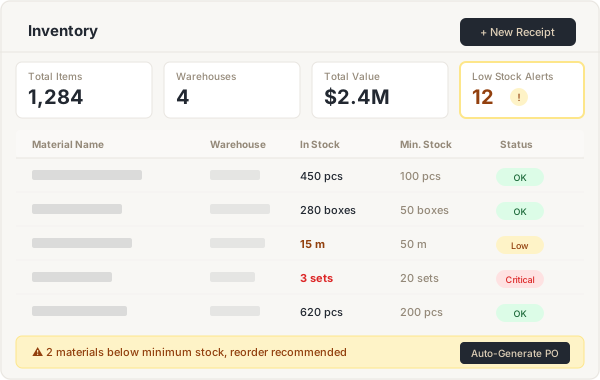
One dashboard for all your inventory
Item name, warehouse, current stock, minimum stock — all in a clean table. Low-stock items highlighted automatically, with a one-click reorder shortcut.
- Filter by warehouse, category, and status
- Low-stock items auto-highlighted
- One-click reorder PO
- CSV import and export